
What is AI Search & Agent – Addon?
The AI Search & Agent Addon is an official extension for User Private Files PRO that transforms static file browsing into a conversational, intent-driven experience.
In traditional document portals, finding a specific file requires clients and team members to memorize exact filenames, recall nested folder paths, or manually scroll through deep directory trees.
The AI Search & Agent Addon eliminates this friction. Users can type natural human requests—such as "Find the NDA signed in March" or "Show me last quarter's tax returns"—and the system instantly returns matching documents. Furthermore, the integrated AI Agent allows users and administrators to execute multi-step file operations (such as creating dated folder sets, sorting files, moving PDFs to archives, or generating zip downloads) directly via simple conversational commands.
Included with Premium & Developer Licenses
The AI Search & Agent Addon is included with User Private Files PRO Premium (2 Sites) and Developer (Unlimited Sites) licenses, Only including Yearly packages. It can be downloaded directly from your User Private Files Account .
Feature List of AI Search & Agent – Addon
Everything you need to turn your WordPress file portal into a smart, automated document hub:
Conversational Natural Language Search: Search across your private file repository using everyday descriptive phrases rather than rigid keyword matches.
Multilingual Query Support: Type queries in any language (e.g., Spanish, French, German, Italian, Hindi). The AI understands the searcher's intent and matches your documents accordingly.
Magic Wand AI Action Execution: Execute real file management operations (creating folders, moving, renaming, trashing, sorting, sharing, zipping) by typing direct instructions.
Zero API or Third-Party Setup: Works out of the box with built-in AI processing. No OpenAI API keys, third-party subscriptions, or complex webhooks required.
100% Privacy-Preserving Architecture: Your actual files, documents, and private folder contents are never transmitted to external AI models. Only the text of the search query is analyzed for intent.
Strict Role & User Isolation: The AI agent operates strictly within the active user’s assigned permissions. Client A can never search, index, prompt against, or manipulate Client B's files.
Context-Aware Folder Execution: Commands and searches operate relative to the current folder view, preventing accidental site-wide file displacements.
Automatic Graceful Fallback: If network limits or connection interruptions occur, the system seamlessly falls back to native keyword indexing so users are never blocked.
How AI Search & Agent – Addon Works
Deploying and using the conversational document assistant requires three simple steps:
1. Installation & Activation
- Log in to your WordPress Admin Dashboard.
- Navigate to Plugins > Add New > Upload Plugin.
- Choose the upf-ai.zip file downloaded from your User Private Files Account .
- Click Install Now, then click Activate Plugin.
- Once activated, the intelligent AI search bar and the Magic Wand agent icon will appear automatically inside your frontend [upf_manager] dashboard and the backend file manager.
2. Natural Language File Search
Instead of typing rigid strings like INV_2026_07.pdf, users can type naturally in the search bar:
- "Show me invoice file for july 26"
- "Find bank statement of 24-25"
- "Show me the expenses file for august 2026"
- "Show me all the files John shared with me"
- "Find the documents I received last week"
- "Show me all PDF files in the Accounting folder"
- "Find the files related to the Smith project"
- "Show me files shared by Sarah this month"
- "Find all invoices"
- "Show me the most recently uploaded files"
- "Find documents containing the word 'contract'"
- "Find the files I uploaded yesterday"
Multilingual Recognition: Users can query documents in their native language:
Spanish: "Busca los archivos que subí ayer" → Displays files uploaded yesterday.
French: "Montre-moi les factures du mois dernier" → Displays last month's invoices.
German: "Zeige mir alle Verträge von letzter Woche" → Filters contracts from last week.
3. Natural Language AI Actions & Commands
Clicking the Magic Wand icon (🪄) in the file manager toolbar opens the AI Command Modal. Enter your command and click Execute. The plugin validates the command against the user's permissions and executes the requested actions instantly.
Supported Command Categories & Examples:
# Folder Creations
• Create folders for remaining months this year
• Create 20 folders with dates from 1 to 20 and add -aug-2026 to each one
• Create recommended folders for a CA firm client portal
• I want a separate folder for financial documents
# Moving Items
• Move reports to docs
• Move all pdf files to docs
• Move all folders to archive
• Move reports folder to trash
# Renaming
• Rename reports to reports-2026 and archive to archive-2026
# File/Folder Descriptions
• Update certificate description to this - this is our certification
• Update current file description to this is our certificate file
# Deleting & Trashing
• Delete reports folder
• Move all pdf files to trash
• Delete everything
# Multi-Action Commands
• Rename 2026 to 2025 and move to archives
• Move everything to archives and rename it to archives 2025
• Create a folder old docs and move all the pdf files there
# Sharing Permissions
• Give John access to reports
• Share all pdf files with John
• Remove John access to reports
• Share reports with all users
• Change john access to all files to view only
# Sorting, Zipping & Downloading
• Sort files by newest first
• Sort files by size, largest first
• Create a zip file containing all the pdf files
• Create a zip file and share with John
• Download all files from reports folder
Operational Notes & Safety Boundaries
To safeguard site stability and maintain data integrity, the AI Agent operates within strict safety parameters:
20-Item Bulk Action Cap: To prevent accidental server timeouts or denial-of-service conditions, batch operations are capped at a maximum of 20 items per command (UPF_AIA_MAX_BULK_ACTIONS = 20). For instance, "Create 20 folders" will succeed, whereas "Create 1,000 folders" will be safely rejected.
Premade Folders Boundary: Automated Premade Folder templates managed at the global admin level are currently isolated and cannot be re-templated via dynamic AI commands.
Flat Hierarchy Creation: Deep multi-tier nested directory creation (e.g., Legal > Contracts > 2026 > Signed) must be executed level-by-level rather than through a single multi-nested command string.
Security & Privacy Architecture: Zero Data Exposure
Because User Private Files PRO is designed for high-compliance environments—including legal practices, CPA firms, medical organizations, and private wealth management—data security is fundamental:
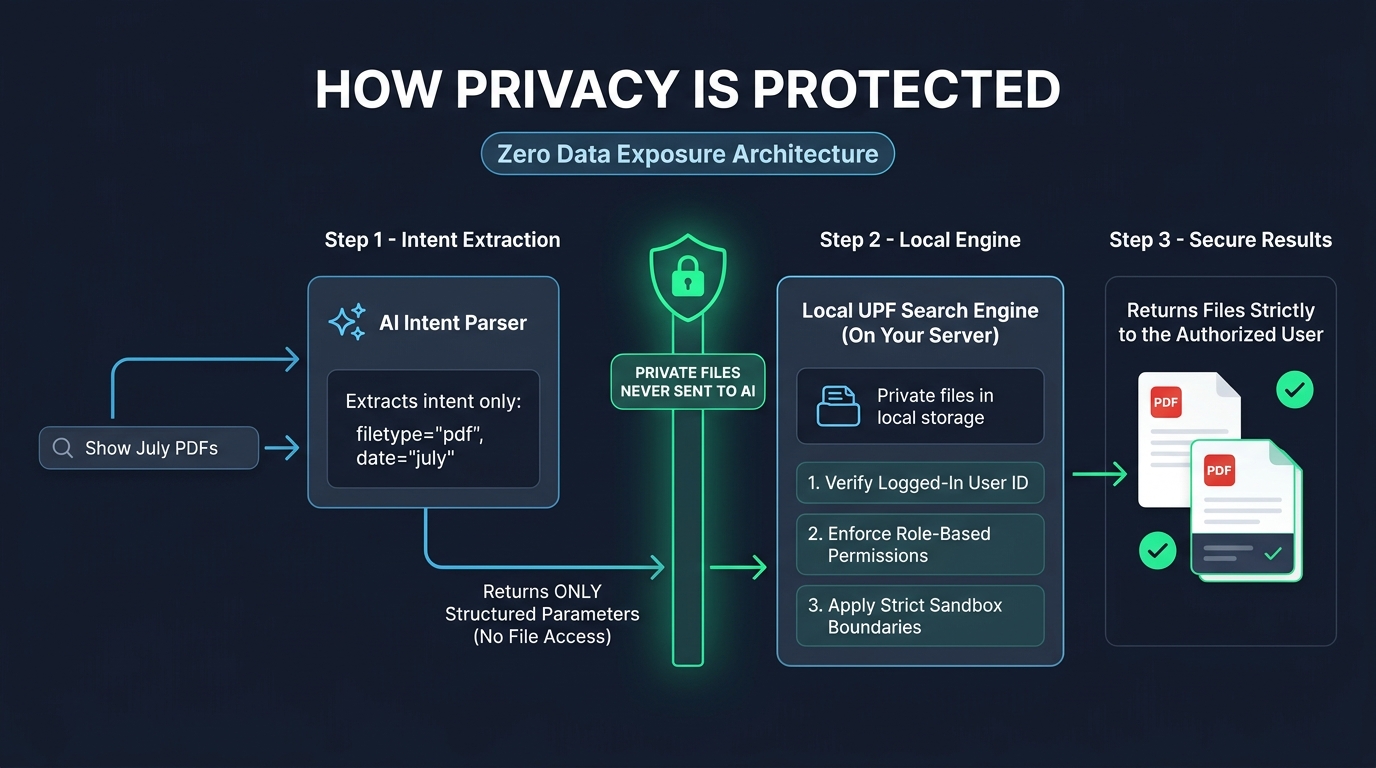
Zero File or Metadata Transmission: Your PDF documents, spreadsheets, client records, and folder names are never transmitted to public or external AI models.
Intent-Only Processing: The AI model only receives the natural language query string to decipher grammatical intent (dates, file extensions, action verbs). It returns structured technical parameters back to the local plugin.
100% Local Execution & Sandboxing: File searches, indexing, and actions are performed strictly on your WordPress web server, verifying WordPress nonces and the active user's permissions before returning any file.
No Model Training on Private Data: Because documents are never shared externally, your proprietary files can never be used to train public machine learning datasets.
Frequently Asked Questions (FAQ)
Do I need an OpenAI API key or any third-party account?
No. The AI Search & Agent Addon includes native, pre-configured AI processing. You do not need to register for OpenAI, configure API keys, or manage third-party billing.
Are my clients' private documents sent to external AI servers?
Never. The addon uses a privacy-first model: only the text of the search query is processed for intent. Your actual files, metadata, and contents remain 100% on your own WordPress hosting server.
Can the AI summarize or generate document content?
No. Because the AI model never accesses the contents of your files, it cannot summarize or generate document text. This deliberate boundary guarantees full data sovereignty and GDPR/HIPAA compliance.
What languages are supported for search queries?
The natural language engine recognizes all major global languages, including English, Spanish, French, German, Italian, Portuguese, Dutch, Hindi, and more.
What happens if the AI service experiences network latency or downtime?
The search bar features automatic, seamless failover. If the conversational service is unreachable, searches instantly default to the native local UPF keyword engine, ensuring users can always locate their files.
Does the AI Agent respect user permission roles?
Yes. Every action and query strictly enforces the active user's role and folder access level (View Only, View & Upload, Full Access). A client can never execute an action or view a file outside their designated private directory.
Your Conversational Document Assistant for WordPress
Upgrade your User Private Files PRO portal from a traditional folder tree into an intelligent, conversational document assistant. Search, filter, and execute file operations using plain natural language commands—with zero configuration and zero external file exposure.