
Text Editor – Addon
Your Built-In Workspace for Text Files
Create, preview, and edit text files directly within your WordPress browser. Empower clients and team members to compose notes, instructions, checklists, and project updates without downloading or re-uploading files.
SEAMLESS COLLABORATION
What is Text Editor – Addon?
The Text Editor – Addon is an official extension for User Private Files PRO that brings full in-browser document authoring and editing into your WordPress client portal.
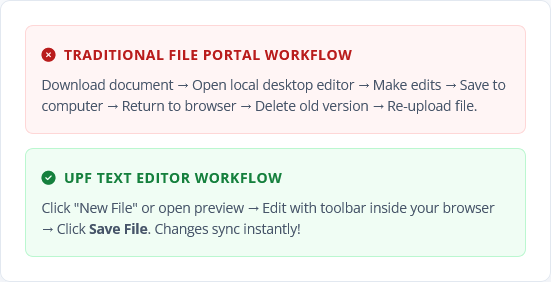
In traditional file management setups, updating a simple note or text file requires downloading the file to your computer, opening desktop software (like Notepad or TextEdit), editing the text, saving, and uploading the replacement.
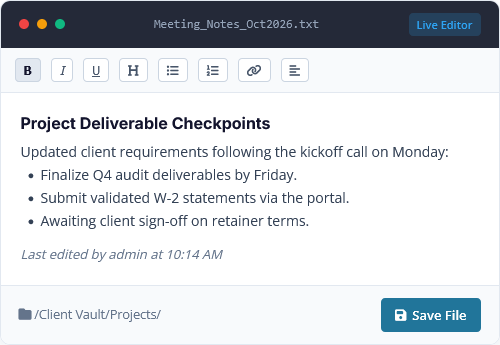
The Text Editor Addon eliminates this friction. Users click a single button to create a new text file or open an existing one, format their content with rich styling tools, and save changes directly to WordPress hosting or Google Drive (Google Drive Addon required) in real time.
Included with Premium & Developer Licenses
Custom Tag – Addon is packaged directly with UPF PRO Premium (2 Sites) and Developer (Unlimited Sites) licenses, including lifetime options.
POWERFUL CAPABILITIES
Feature List of Custom Tag – Addon
Everything you need to turn raw files into an organized, searchable document database.
One-Click File Creation
Adds a dedicated "New File" option inside the main "New" button dropdown. Users name their file and start typing immediately.
Edit Existing Documents
Click on any text file in personal or shared folders to open it inside the live editor. Make adjustments and save revisions instantly.
Rich Formatting Toolbar
Powered by a customized CKEditor toolbar. Easily apply bold, italics, underlines, headings, bullet points, numbered lists, and hyperlinks.
Role-Based Visibility
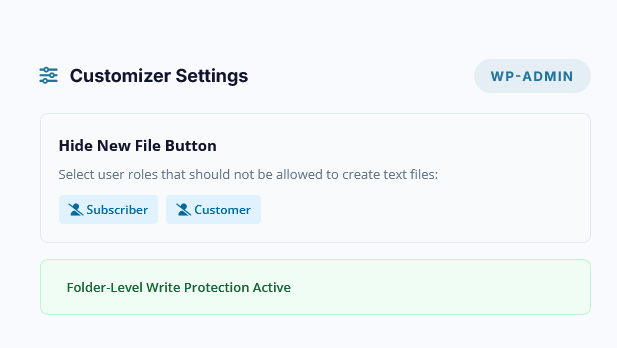
Administrators can selectively hide the "New File" button from specific user roles via the settings customizer to maintain strict upload policies.
Automatic Quota Sync
Whenever a file is edited, the addon automatically recalculates the document size, updates parent folder storage, and refreshes user quota caches.
Precise Permission
Strictly enforces folder permissions (View Only, View & Upload, Full Access). Only authorized contributors can edit or overwrite files.
Activity Log Tracking
Hooks directly into the Activity Logs Addon, logging every text file creation and update with exact timestamps and author usernames. Activity Log Addon required.
Google Drive Sync
Seamlessly integrated with the UPF Google Drive Addon. Files stored in Google Drive can be edited and synchronized without leaving WordPress. Google Drive Addon required.
STREAMLINED FLOW
How Text Editor – Addon Works
Create and edit documents in three straightforward steps.
1
Create or Select a File
Click the New > New File button in the dashboard toolbar, give your file a name, or click on an existing text file to open its preview.
2
Write & Format Content
The text editor opens inside the viewport. Compose your notes, add bullet points, format headers, or paste code and checklists as needed.
3
Click "Save File"
Click the Save button. The addon updates the file on the server, logs the activity, updates the folder size cache, and keeps all shared collaborators in sync.
PRACTICAL APPLICATIONS
Built for Seamless Team and Client Collaboration
Enhance your client portal with quick documentation, shared notes, and instructions.
Client Onboarding Checklists
Provide a shared checklist inside a client's private folder detailing onboarding steps, credentials, or required files.
Example: Welcome_Checklist.txt — Editable by both client and project manager.
Meeting Summaries & Notes
Quickly document decisions and milestones after client calls and save them directly in the shared project folder.
Example: Weekly_Sync_Oct04.txt — Formatted with headings and bullet lists.
Code Snippets & Configs
Share code snippets, API keys, JSON payloads, or server configuration parameters with developers and clients.
Example: Webhook_Config.txt — View and copy clean text without file conversions.
Case Notes & Logs
Legal and consulting teams can keep chronological incident or case logs accessible to authorized associates.
Example: Case_Timeline_Log.txt — Continuously updated with timestamped entries.
Office Policies & SOPs
Maintain standard operating procedures and internal contact rosters that can be updated in seconds.
Example: Emergency_Procedures.txt — Always up-to-date in the company handbook folder.
Client Feedback & Revisions
Allow clients to jot down change requests and feedback directly beside their project deliverables.
Example: Design_Feedback_Round1.txt — Collaborative feedback right in the portal.
SECURITY & GOVERNANCE
Strict Role Control and Access Enforcement
The Text Editor Addon adheres strictly to User Private Files PRO's security rules:
Hide by User Role: Keep your interface clean by disabling the "New File" button for specific roles (e.g. read-only clients or subscribers) while keeping it active for staff.
Respect Folder Permissions: If a user only has "View Only" access to a folder, they cannot create or edit files in that directory. Only users with "View & Upload" or "Full" access can write changes.
Sanitized File Writing: All document submissions are verified with WordPress security nonces and sanitized before saving to disk.
FAQ
Frequently Asked Questions
What is the Text Editor – Addon?
The Text Editor – Addon is an official extension for the User Private Files PRO plugin that lets users create, preview, and edit text files directly in their browser without needing desktop software or re-uploading.
Which license includes the Text Editor Addon?
The Text Editor – Addon is included with both the Premium License and the Developer License, in both Annual and Lifetime pricing options. If you hold a Starter PRO license, you can upgrade via your account dashboard.
How do users create a new text file?
In the frontend file manager, click the "New" button dropdown and select "New File". A prompt will ask for the filename. Enter the name, click Create, and the editor opens instantly.
Can users edit existing text files?
Yes. When authorized users click on an existing text file, the editor loads the current contents. You can edit the text, apply formatting, and click "Save File" to update the document on the server.
Does it work with the Google Drive Addon?
Yes! If you have the UPF Google Drive Integration Addon active, newly created and updated text files are synchronized directly to your connected Google Drive storage.
Can I restrict who is allowed to create text files?
Yes. In the WordPress admin under the plugin's Customizer settings, administrators can select specific user roles under "Hide New File Button" to remove text file creation privileges for those roles.
Are text file edits logged in the Activity Log?
Yes. If you are using the Activity Log Addon, every file creation (`FILE_CREATE`) and update (`FILE_UPDATE`) is recorded with the editor's username, document title, and timestamp.
What formatting tools are available in the editor?
The editor provides a clean formatting toolbar with bold, italic, underline, heading formats, numbered lists, bullet lists, alignments, and hyperlink insertions.
What file extensions are saved by the editor?
By default, newly created files are saved as standard `.txt` plain text documents with full UTF-8 encoding support, ensuring universal compatibility across all devices and platforms.
Do I need User Private Files PRO to use Text Editor addon?
Yes. The Text Editor Addon is an official extension designed specifically to integrate seamlessly with the file dashboard and permission system of User Private Files PRO.
Streamline Document Editing with
User Private Files PRO
Upgrade to a Premium or Developer license to unlock Text Editor – Addon alongside the AI Agent, Custom Tag Addon, Google Drive Integration, and Activity Logs.