
Custom Tag – Addon
Add your own tags to files while uploading
Standardize your client documents with custom metadata, custom tags, and structured attributes. Display custom fields in frontend list columns, inspect them in the sidebar, and search across all tags in real time.
SMARTER FILE SEARCH
What is Custom Tag – Addon?
The Custom Tag – Addon is an official extension for User Private Files PRO that allows site administrators to attach custom metadata fields to uploaded files and folders.
Standard file managers force you to cram critical details like invoice numbers, approval states, and client IDs into filenames. With Custom Tag – Addon, your clients and team members can categorize every file with dedicated single-line text inputs and multi-line textareas.
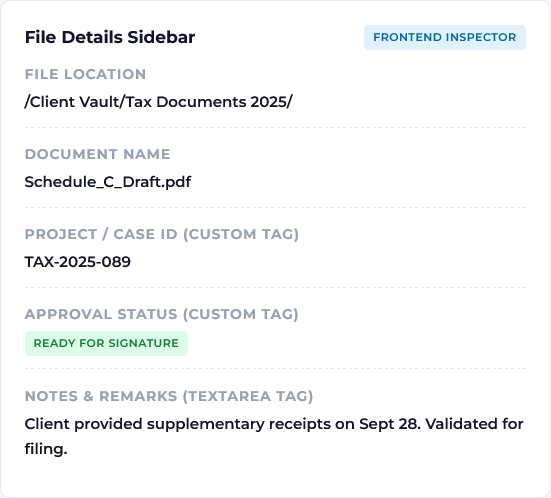
Values entered into custom tags automatically populate into the frontend file manager list columns, display neatly in the file details sidebar, and are fully searchable through the built-in UPF search engine.
Included with Premium & Developer Licenses
Custom Tag – Addon is packaged directly with UPF PRO Premium (2 Sites) and Developer (Unlimited Sites) licenses, including lifetime options.
POWERFUL CAPABILITIES
Feature List of Custom Tag – Addon
Everything you need to turn raw files into an organized, searchable document database.
Unlimited Custom Tags
Create as many custom metadata attributes as your workflow requires. Add labels like Department, Invoice #, Batch ID, or Case Number with zero coding.
Text & Textarea Types
Choose single-line text fields for short codes, numbers, and dates, or multi-line textareas for detailed client notes, summaries, and internal instructions.
Frontend List Columns
Optionally display custom tags as dedicated columns directly in the frontend file dashboard table. Features column resizers for clean layout control.
Sidebar & Preview Sync
Tags automatically appear inside the file preview popup and right-hand file information sidebar, making metadata visible alongside download and sharing tools.
Prompt to Upload
Optionally display an input popup immediately upon file upload. Users are required or prompted to supply metadata before the file is finalized in their folder.
Required or Optional
Enforce mandatory tags for mission-critical information (e.g. Account Number), or keep them optional for supplementary notes and internal tags.
Hide Default Columns
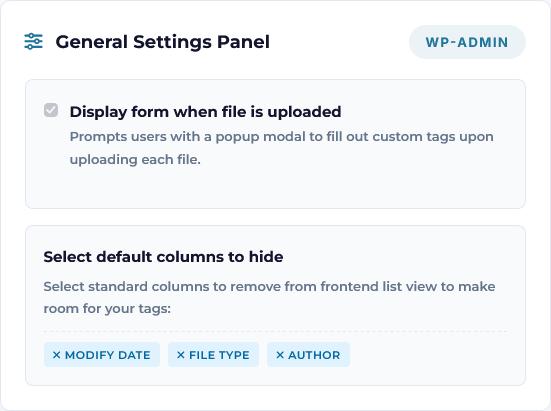
Prevent horizontal scrollbar clutter by hiding standard WordPress columns (Modify Date, Type, Size, Author) to prioritize your custom tag columns.
Search by Custom Tags
Frontend search queries instantly query your custom tags across personal files, shared folders, pre-made folders, and public document directories.
WORKFLOW OVERVIEW
How Custom Tag – Addon Works
Get set up in less than 3 minutes directly inside your WordPress admin dashboard.
1
Define Tags in Admin
Navigate to User Private Files > Settings > Custom Tags. Click "Add New", enter your tag title (e.g. "Remarks"), select field type, and choose where it should appear.
2
Capture on Upload
Enable the upload prompt form to collect metadata as files are uploaded, or allow users to add and modify tag details anytime through the file preview panel.
3
Sort, Inspect & Discover
Your custom tags are immediately visible in the frontend list view columns and sidebar. Users can search by tag values to retrieve files in seconds.
VERSATILE APPLICATIONS
Tailored for Every Professional Client Portal
See how top businesses structure their files using the Custom Tag Addon.
Accounting & Tax Firms
Tag client returns, receipts, and 1099 statements with exact filing years and validation checkpoints.
Tags used: Tax Year, Form Type, CPA Approval State, Missing Documents Note
Law Firms & Legal Teams
Classify pleadings, discovery bundles, and signed retainer agreements under matter numbers.
Tags used: Matter / Case ID, Court Docket #, Confidentiality Status, Filing Date
Agencies & Creative Studios
Organize brand deliverables, photography sets, and client revisions without cluttering filenames.
Tags used: Campaign Name, Revision Number, Deliverable Format, Client Sign-off
Real Estate & Property
Tag tenant applications, lease agreements, and inspection reports per property parcel.
Tags used: Property Address, Unit Number, Lease Expiration, Tenant ID
Healthcare & Clinics
Store patient consent forms, lab results, and consultation summaries securely with audit identifiers.
Tags used: Medical Record #, Doctor Code, Department, Lab Test Type
Intranets & HR Portals
Maintain employee handbooks, onboarding packs, and reviews with clean internal tags.
Tags used: Employee ID, Department, Document Expiry, Review Period
ADMINISTRATIVE FLEXIBILITY
Control Over Upload Form & Columns
Every client portal has unique UI requirements. Custom Tag – Addon provides two key controls to ensure your dashboard stays fast, uncluttered, and tailored:
Enforce Tagging on Upload: Activate "Display form when file is uploaded" to open a modal asking for tag details for each file as soon as it is uploaded.
Keep Tables Compact: Hide redundant standard columns like File Type, Author, or Size so your custom columns have optimal width and visibility.
Instant Reset Safeguard: Easily restore settings and tag structures back to defaults anytime with the one-click tab reset tool.
FAQ
Frequently Asked Questions
What is the Custom Tag – Addon?
The Custom Tag – Addon is an extension for the User Private Files PRO plugin that lets you define custom fields and metadata tags (such as Invoice Number, Client Code, Status, or Remarks) and attach them to files and folders on your WordPress site.
Which license includes the Custom Tag – Addon?
The Custom Tag – Addon is included with both the Premium License and the Developer License, in both Annual and Lifetime pricing options. If you hold a Starter PRO license, you can upgrade via your account dashboard.
What field types can I create for custom tags?
The addon currently supports two field types: Text (single-line input ideal for codes, numbers, dates, or tags) and Textarea (multi-line text field ideal for notes, descriptions, reviews, and instructions).
Where do custom tags appear on the frontend?
Custom tags can appear in two frontend locations based on your settings:
1) As dedicated, resizable columns in the file dashboard's List View table; and
2) Inside the file preview popup and right-hand File Information Sidebar when any document is clicked.
Can users search for files using custom tag values?
Yes. Custom tags are automatically indexed by the UPF search engine. When a user types a project ID, invoice number, or remark in the frontend search bar, the system queries custom tag values across personal files, shared files, pre-made folders, and public libraries.
What happens when I enable "Display form when file is uploaded"?
When this setting is enabled, a modal form automatically opens immediately whenever a user uploads a file, prompting them to enter values for each custom tag. Note: Enabling this feature replaces the bulk multi-upload function with per-file modal tagging to ensure each document receives valid metadata.
Can I make custom tags required?
Yes. When defining or editing any custom tag in the admin panel, you can check the "Required" option. When the upload form modal is presented, users will be required to fill in the field before saving.
Can clients update custom tags after a file is uploaded?
Yes. Authorized users can open the file preview popup or file details sidebar at any time to view, add, or update custom tag information.
How do I hide default columns to keep list view clean?
In the WordPress admin panel under Settings > Custom Tags, use the "Select default columns to hide" option. You can choose to hide Modify Date, Type, Size, and Author to ensure your custom tag columns take center stage on both desktop and mobile.
Do I need User Private Files PRO to use this addon?
Yes. Custom Tag – Addon is a dedicated extension designed specifically to extend the core file manager, permissions, and database architecture of User Private Files PRO.
Start Uploading with
User Private Files PRO
Everything you need to manage your private files online with WordPress