
ACTIVITY LOG - ADDON
Every File Action,
Fully Audited
Track every action performed inside your User Private Files environment in real time. Log uploads, downloads, renames, PDF signatures, comments, moves, shares, and access modifications with precise timestamps.
FULL ACCOUNTABILITY
What Is Activity Log – Addon for User Private Files?
The Activity Log – Addon is an enterprise-grade extension for User Private Files PRO that turns your WordPress document portal into an auditable file-management environment.
Whether you are managing confidential client tax returns, legal contracts, medical reports, or corporate assets, knowing exactly who accessed, signed, downloaded, or shared a file is vital for compliance and dispute prevention.
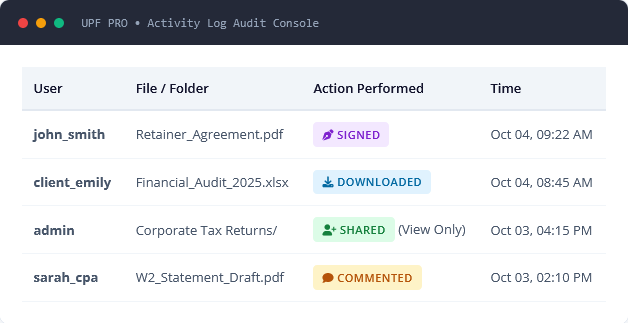
The addon records every precise operation into an optimized, dedicated database table. Administrators can inspect the central audit log from the WordPress backend, view file histories inside the frontend information sidebar, or clear logs with a single click.
Included with Premium & Developer Licenses
Custom Tag – Addon is packaged directly with UPF PRO Premium (2 Sites) and Developer (Unlimited Sites) licenses, including lifetime options.
POWERFUL FEATURES
Feature List of Activity Log – Addon
Maintain visibility over every document, user interaction, and security permission across your entire portal.
Detailed Action Tracking
Logs all file and folder operations: uploads, folder creations, renames, moves, downloads, comment threads, ZIP archives, and deletions.
Precise Timestamps
Every logged event captures the exact date and time the action occurred, providing a dependable timeline for compliance and auditing.
Access Permission Logs
Keep a clear record whenever file access is granted or revoked. Records target user emails, roles, and assigned permissions (View Only, View & Upload, Full).
PDF Signature Auditing
Seamlessly records when users digitally sign PDF documents using the UPF signature module, logging who signed and the completion timestamp.
Frontend Sidebar History
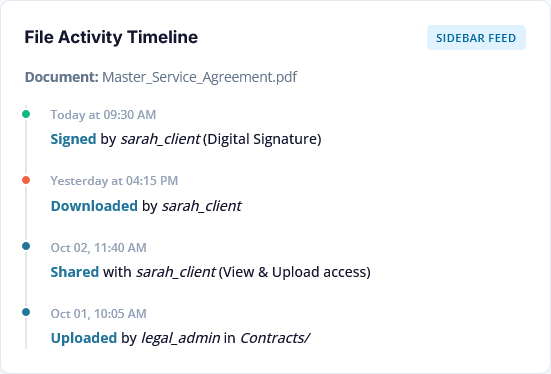
Optionally display a chronological activity feed inside the right-hand file information sidebar so users and clients can inspect document milestones.
Frontend Visibility Switch
Toggle frontend activity display on or off. Keep logs strictly private for site administrators or make them transparent to clients as needed.
Sync & Automation Logs
Tracks background events including server folder syncs, external link creation, file locks/unlocks, and auto-delete cron purges.
One-Click Log Purge
Easily reset and clear all historical activity logs directly from the admin dashboard with a single button click when database maintenance is needed.
EVENT COVERAGE
Every File Action, Fully Audited
The Activity Log Addon monitors the entire file lifecycle inside User Private Files PRO.
Upload & Create
Logs new file uploads, blank text file creations, and new folder generation with path details.
Download & Access
Records when users download single files or retrieve files within shared client folders.
Sign & Verify
Captures electronic PDF signatures applied to documents, verifying user identity and completion time.
Share & Permissions
Audits when files or folders are shared with users or roles, including specific access tiers.
Remove Access
Logs when permissions are revoked from users, safeguarding document confidentiality.
Rename & Edit
Tracks title renames and description updates, retaining old and new values for transparency.
Move & Organize
Records file and folder transfers between directories, tracking source and destination folders.
Comment Threads
Audits when comments or notes are added to files, including internal owner-only messages.
Trash & Permanent Delete
Logs when files are trashed, restored, auto-deleted via expiration cron, or permanently erased.
SIMPLE SETUP
How Activity Log – Addon Works
Set up comprehensive activity tracking with zero technical configuration.
1
Enable in Settings
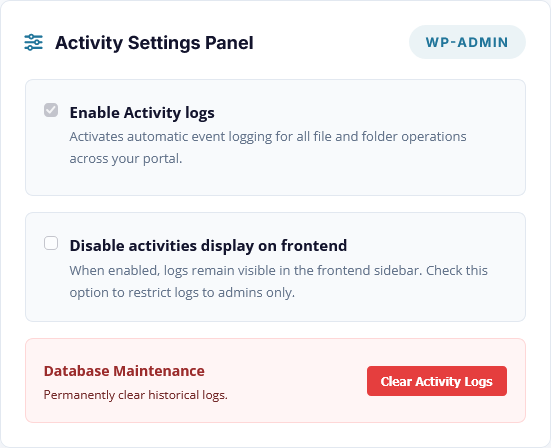
Navigate to User Private Files > Settings. Toggle on "Enable Activity logs" to create the dedicated audit table and initiate automated tracking.
2
Silent Background Auditing
As clients and team members upload, download, sign, comment, and share files, the addon logs each event with exact usernames, actions, and timestamps.
3
Review & Manage Logs
Inspect the complete audit feed from the WordPress admin menu, view file-specific timelines in the frontend sidebar, or clear logs whenever needed.
FULL ACCOUNTABILITY
Complete Control Over Privacy and Data Retention
The Activity Log Addon gives site owners flexible control over who sees activity history and how data is maintained:
Frontend Sidebar Display: When enabled, clients can see the complete history of their files in the right-hand panel, answering "who edited this?" without contacting support.
Admin-Only Stealth Mode: Toggle "Disable activities display on frontend" to keep all audit data strictly confidential for administrators in the WP-Admin screen.
One-Click Log Purge: Easily clear all stored activity logs with the "Clear Activity Logs" button to keep your database lean.
PRACTICAL APPLICATIONS
Built for Regulated and High-Trust Workflows
Protect your business with clear, timestamped proof of every document interaction.
Accounting & Tax Firms
Verify when clients downloaded their final tax returns or uploaded requested receipts and 1099s.
Proof provided: Upload confirmations, comment discussions, audit document delivery.
Law Firms & Legal Teams
Maintain an undeniable chain of custody for discovery filings, agreements, and client signatures.
Proof provided: Exact download times, digital signature verification, access removal dates.
Agencies & Consultants
Eliminate deliverable disputes by tracking when clients accessed mockups, proposals, and contracts.
Proof provided: Proposal views, ZIP archive downloads, feedback comment logs.
Real Estate & Property
Confirm lease document delivery and tenant contract signings with exact time verification.
Proof provided: Tenant lease downloads, signed inspection reports, folder shares.
Healthcare & Clinics
Track access to sensitive patient records and medical histories in compliance with privacy protocols.
Proof provided: Patient file views, staff access grants, document modifications.
Corporate Intranets & HR
Ensure mandatory handbooks and policy updates are downloaded and acknowledged by team members.
Proof provided: Policy handbook downloads, employee document updates.
FAQ
Frequently Asked Questions
What is the Activity Log – Addon?
The Activity Log – Addon is an extension for User Private Files PRO that records every user and administrative action performed on files and folders across your WordPress site. It logs uploads, downloads, renames, moves, PDF signatures, comments, shares, deletions, and access permission changes with exact timestamps.
Which User Private Files license includes this addon?
The Activity Log – Addon is included with both the Premium License and the Developer License, in both Annual and Lifetime plans. Starter PRO license holders can upgrade anytime through their account dashboard.
Does the Activity Log track when clients download files?
Yes. The addon records every single file download event, logging the downloading username, the exact document title, and the timestamp. This provides verifiable proof that a client received and opened a file.
Can clients see file activities on the frontend?
Yes, if enabled. When a file is selected in the frontend file dashboard, its chronological activity history appears in the right-hand file information sidebar. However, administrators can easily hide this section from clients by enabling the "Disable activities display on frontend" setting.
How do administrators view the complete activity log?
Administrators have access to a dedicated Activity Logs screen under the User Private Files menu in the WordPress admin area. This screen displays a comprehensive, chronological table showing the User, File/Folder Name, Action Performed, and Timestamp.
Are PDF electronic signatures recorded in the log?
Yes. When users digitally sign a PDF using the built-in UPF e-signature feature (introduced in v4.4.9), the Activity Log captures the event as a verified "Signed" action along with the user's name and exact completion timestamp.
Does the Activity Log slow down my WordPress site?
No. The addon creates an isolated, optimized database table (`wp_upf_activity_logs`) with structured indexes. Logging operations execute asynchronously alongside standard UPF actions with zero noticeable performance impact.
How do I clear or delete old activity logs?
Inside the WordPress admin dashboard under User Private Files > Activity Logs, administrators can click the "Clear Activity Logs" button. An instant confirmation dialog ensures you don't delete logs by accident, purging historical records via AJAX.
Are folder permission changes tracked?
Yes. The addon records both folder sharing and access revocations. It specifically logs the recipient's email or role as well as the granted access level (e.g., View Only, View & Upload, or Full access).
Do I need User Private Files PRO installed first?
Yes. The Activity Log Addon is an official extension designed specifically to hook into the file, folder, and user permission architecture of the User Private Files PRO core plugin.
Start Auditing Your Client Files
User Private Files PRO
Upgrade to a Premium or Developer license to unlock Activity Log – Addon alongside the AI Agent, Custom Tag Addon, Google Drive Integration, and Text Editor.